
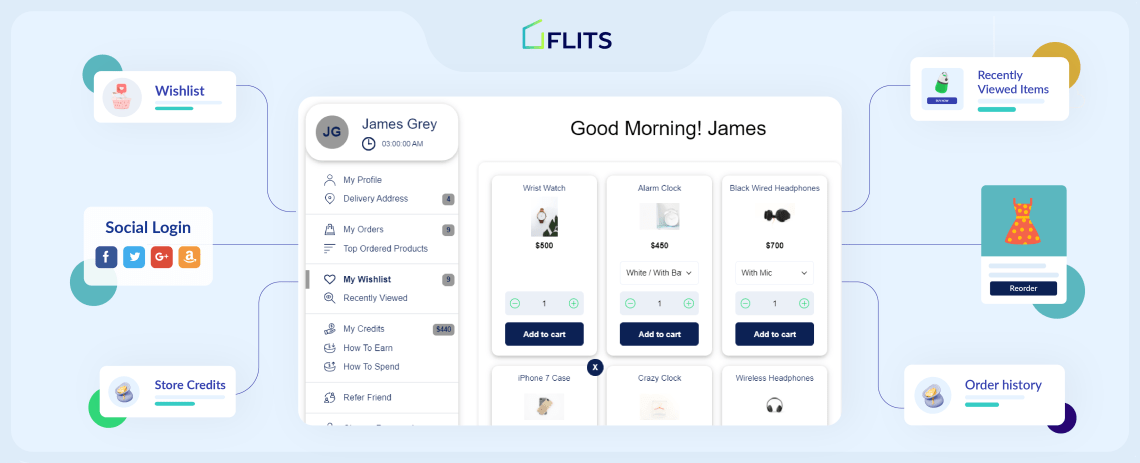
What does it take for you to engage shoppers like Amazon does? A Shopify customer account page.
Online shopping is often troublesome for the customer because it’s mostly all about self-service. In a physical store, customers can take the help of the employees, but unfortunately, such an option is not available when it comes to online shopping. The customer can’t call up your head office and ask for help at every step. Moreover, it will be difficult for your support staff to keep up with such queries. This is why a customer account page is a must-have for the new stores.
A Shopify customer account page makes it easier for them to access the products they like, the recent orders they have placed and more in one place. A hassle-free online experience guarantees a returning customer. Here is a list of 9 features that provide great convenience, reliability, and flexibility to frequent shoppers.

Example of a proper customer account page
You’d be surprised to know the many reasons customers leave eCommerce websites. For example, bad navigation, non-responsive pages, poor design, unclear text, slow loading pages, are a few reasons, among others. The good thing is, we know the reasons that can tick-off customers and make them leave your site.
So, in this section, we focus on what you can do to attract customers, engage them, and boost sales. The answer in short is: ace your Shopify customer account page user experience (UX). From the elements you choose to include in the customer account to getting page navigation right to understanding what your customers want—here are the 10 must-haves to focus on.
Must-have features of a Shopify customer account page
1. Detailed customer information
A basic customer account page must-have details like ”First name”, ”Last name”, “Contact”. Apart from this, Gender and Birth-date are other important fields. Gender of the customer is an important aspect as it helps you determine your target customer and what they would prefer buying. Birth-date helps you determine their age. It also gives a fantastic opportunity to pamper your customer by giving them exciting offers on their birthday.
The option to edit these details should also be there, so that customers can keep their profile updated. In addition, this page can also have the customers’ phone number, email address, mailing address, among other contact details. Most Shopify sites have a default customer information section in the customer account. However, it’s basic and does not include all the above options. Hence, you must customize this section to ensure you collect as much information as possible about your customers. It will only make your data bank richer and generate more opportunities for personalization and knowing your customers better.
2. Order history
A well-designed order history feature encourages a seamless and user-friendly purchasing experience, which fosters consumer loyalty and promotes repeat business. It helps customers in many ways, such as reorder their recurring purchase items with just a few clicks.
This section promotes transparency as customers can easily access their past orders and related information. It helps in resolving any potential payment or delivery concerns. Additionally, the order history function for businesses creates new opportunities for customer engagement because merchants may use this information to make personalized recommendations and promotions based on customer preferences.
Order history must contain the following:
- Order number
- Order status
- Name of the items
- Total number of items ordered
- Quantity of each item ordered
- Thumbnail of the product for easy recognition
- Order details with customer’s addresses (for multiple addresses), contact and other required information
- Cost breakup
- Payment mode
3. Delivery addresses
A single customer may have different delivery addresses so they must have an accessible and editable address directory of their own. Such an address list saves time while checking out.
Ecommerce stores can create a positive user experience by making it effortless for customers to edit and update and add multiple delivery addresses. This not only makes checkout faster, but also ensures the delivery addresses are accurate and updated at all times.
What is more, having an optimized and efficient delivery address section helps with localization strategies. Localization can help you engage customers better with targeted promotional campaigns and increase sales.
4. Re-order button
A re-order button is another essential feature that online shopping websites must provide. The button can be given separately or just below every order. Food delivery apps offer this option in general, but it would be wise for other websites/apps to follow suit. It will help the customer in saving time while re-ordering a product in one click instead of going through the trouble of finding the product and placing the order.
The reorder feature also provides many benefits to Shopify merchants. Some of them are:
- Consistent and more sales due to the ease of shopping
- Improved data collection—customer preference, shopping behavior
- Better inventory management as you can predict future stock requirements based on past reorder patterns
- Craft reorder alert campaigns to nudge customers to restock their favorite items
However, you must follow some best practices mentioned below:
- Create a separate reorder tab in the customer account
- Offer exclusive incentives on reorders
- Create targeted reorder campaigns
- Activate automation of reorder alerts across communication channels
5. Recently viewed products
This feature is often neglected but is an essential feature that any online shopping website must-have. While browsing through your products, the customer clicks on the product they are likely to buy. But in their quest to find a better product, they may quickly get back to browse other products.
What if after checking out ten products, the customer realises that the other product they saw was the best one. How will the customer find the product? Do we leave them at the mercy of browser history or force them to go through all the products again. What if they are unable to find the product and ultimately decide to give up? Can we afford to lose the customer just because you were careless enough to not provide them with the option of “Recently viewed products”.
Recently viewed products feature has many benefits for customers and Shopify merchants:
- Customers feel more connected to your brand because this feature helps them make purchase decisions
- It helps increase sales—when you show the products customers liked multiple times, they might feel enticed to buy it
- It makes checkout easy—customers can click on ‘buy now’ from the recently viewed products section
- This feature also helps boost customer engagement
Read: Why Shopify Recently Viewed Products Is a Must-Have Feature And How To Use It
6. Refund Policy
Before any online purchase, a customer is concerned about the fact that how will they get a refund if they don’t like the product. Questions like ”Will I get my money back directly into my account or will I get credit in the shopping wallet” go through the customer’s mind. Often customers feel duped if the website fails to mention these terms and offer them credit in an online wallet instead of returning the money in their bank accounts.
Hence, refund policy becomes an important aspect when it comes to the online market. All the terms and conditions related to the refund policy should be available on a separate page. A Clearly stated policy will establish trust amongst your customers.
The refund policy page tab should be included in the customer account page as it makes it easy for customers to find the page or refer to the policy every time they want to. A clearly crafted refund policy brings clarity and customer confidence and trust. It helps reduce risks for customers, making them more comfortable with making purchases.
What is more, a transparent and customer-centric refund policy also helps increase sales by giving your brand a competitive edge.
7. Return Policy
Apart from the refund policy, the ‘Return policy’ is equally important. If you have a separate policy for certain products, mention it along with the product. Else a general return policy, terms and conditions should be specified on the customer account page.
Just like the refund policy, the return policy, too, helps build a positive reputation of your brand. It also reduces your customer support team’s workload. Customers do not have to depend on your customer support to know details about the return policy. They can simply go to the customer account page and read the return policy.
8. ‘Contact us’ form
More often than not, customers have trouble locating contact information of the company. The average monthly search of Amazon’s contact information is around 100K-1Million. These numbers prove that one of the biggest online shopping platform’s customers also have trouble locating contact information of the company. Customers may drop the idea of buying something if they can’t find a way to contact you. Absence of a ‘Contact Us’ option may lead the customer to think that there is no redressal mechanism.
You could have contact details such as phone number, email address, social media messengers, or a form. However, you must ensure you have the bandwidth to respond to customers on all these channels. If you don’t, it’s better to not provide too many communication channels.
Apart from increasing sales, the contact us feature also helps you grow your contact list and capture leads. Once you have shoppers’ contact details, you can target them with marketing and promotional campaigns to boost sales.
Another way the contact us form helps is to generate feedback. Customers might write to you to share feedback on your product or website via your contact us page.
9. Order tracking
Once the customer has placed the order, they should not have trouble locating where their product is. A transparent order tracking system frees them from worrying about their order. They must be able to track whether the ordered product is still in the warehouse/has been shipped or has reached the local warehouse of the delivery company.
No way of tracking the order is the biggest woe of any customer. They should not be forced to call customer care to track the order. Therefore Tracking ID and regular updates about the order must be provided.
The customer account page can make order-tracking easy and quick. All the customers have to do is go to their orders and click on the track order button. This feature helps in many ways:
- It reduces customers’ post-purchase anxiety
- It enhances customer experience
- Reduces customer support costs
- Brings peace to customers and reduces your workload
- Automating order-tracking updates ensure a seamless experience
- Helps engage customers—tracking alert emails have open rates between 50% to 80%
10. A branded Shopify customer account page template
Just like the remaining pages of your Shopify store, your customer account page must also be branded to the T to give your shoppers a seamless experience across their buying journey. With a Shopify app like Flits, you get access to two customer account page templates that can be customized with your brand colors, templates, font colors and much more.
But why should you customize your customer account page?
- Bring consistency in the look and feel of your website
- Improves brand recollection
- Makes customers associate with the brand better
But what does it mean to brand your Shopify customer account page? Let’s look at a few ways to match your customer page to your brand:
- Choose a good customer account page template that goes with your brand style
- Change the color of the navigation bar to match your brand palette
- Change the color of the text to match the brand and to make it look good
- Change the color of all the buttons such as ‘reorder’, ‘buy now’, ‘add to cart’, etc.
- Include marketing features tabs in the customer account page
Is your Shopify customer account page all set?
For an E-commerce site, the customer account page is the key to success. While building an e-commerce site for your online business, keep customer satisfaction in mind and you’ll be rewarded with customer loyalty. Not only this it also gives the merchant easy access to the information they need about the customer and the orders they place. Hence, Every shopping website must have a robust and friendly account page.
Frequently asked questions (F.A.Q.)
Q. What is a Shopify customer account page?
A. A Shopify customer account page is a section or a customer portal that consists of all important details of the customer, that the customer can access easily.
Q. Why is customer account page important?
A. Customer account page is important for branding, visual appeal and most importantly to give users a space from where they can access details like profile, order history, addresses, wish-list, reward program etc. (Some features are an add-on)
Q. How does a customer account page increase my sales?
A. Customers can easily re-order items from customer account page, they can check their wishlist from account page, merchants can display special collection page through Link store pages, list down rules of earning credits under ”How earn credit page”. (Some features are an add-on).
Shopify brands with these customer account page features
In this section, you can find some of the best Shopify and Shopify Plus brands that have created comprehensive customer account pages with the help of Flits customer account page app. These examples can be a good reference for you to get started with your customer account page.
1. Snitch

A clothing and apparel brand, Snitch, started as a B2B brand, but later moved to the D2C market. The brand was looking for a solution that provided customer account features to meet its requirements, particularly, set up a multi-level reward program, floating reward widget to entice customers, wishlist button so customers can save products they like, integration with a checkout solution, and social login feature.
That’s where Flits customer account page app came in, set up a customer account page that matched the brand’s color theme. Flits ensured a smooth rewards program with multiple stages like signup, first order, birthday credit with store credit, etc. In addition, incorporated Flits add-on features, such as wishlist, etc.
2. Borosil

Borosil, a glassware company, was looking to set up a customer account page that allowed quick login options, multi-level reward program, wishlist, advanced order filter, customized buttons on the page for returns and cancellations, among other features.
With the help of Flits app, the brand was able to achieve a customer account page just the way they imagined it, as seen in the image. Their customer account page features now include a Return Prime button, multi-level rewards program, order cancellation button, and other tools are integrated to ensure a comprehensive customer account page.
3. Suzie Skincare

The cosmetics brand, Suzie Skincare, wanted customized customer account page features, such as matching brand color, FAQs, returns, social login, among others. Flits app fulfilled all their customization requirements, along with the standard features that we find on most eCommerce customer account pages. The brand has customized the page to include many unique features, ensuring their customers have the best experience when shopping on their site.
4. Uptown Spirits

Uptown Spirits is a liquor brand that wanted a clean and comprehensive look for its Shopify Plus customer account page. Their customer account page features include basic features such as profile, orders, address, and some unique features such as top ordered products and recently viewed. Overall, the page is customized to match the brand colors as seen on their website.
5. Synergee Canada
The Canada-based fitness and sports brand, Synergee Canada, wanted to create a customized layout to improve the functionality of the page. In addition, the brand also wanted to bring in the element of branding by adding customized menu titles.
With the help of Flits app, the brand was able to create a unique customer page experience that matched its brand personality. The customization features helped change the layout with profile, delivery address, merging password change option, among other features. In addition, the brand could rename the order history feature to ‘My gym’, which aligns better with what the brand offers its customers.
Best practices to follow when adding customer account page features
There are a lot of strategies being applied by eCommerce stores. Every brand is trying to provide unique customer account experiences. However, many brands miss the point and try to do something that could backfire. We want to ensure you don’t end up making those mistakes and hence, here’s a list of best practices for customer account pages for online stores.
1. Choose relevant features
It’s tempting to want to have all the features you see on customer account pages of online stores. Especially your competitors’ stores. But that’s not the ideal way to go about planning your Shopify customer account page.
Too many features will cause unnecessary clutter, impact your page load speed, eat up more resources, and you might not be able to keep all the features updated and active at all times.
Do this:
- Choose only relevant features — those that go well with your industry, products and services, and customer preferences
- Ensure your features add value to customers and make their experience better
- You could conduct a survey involving your existing customers or your most loyalty customers to understand the features they’d like to have in the customer page
2. Ensure easy navigation
One thing that can put off customers is difficult or confusing shopping experiences. Imagine you aren’t able to find where to check your store credits on the customer account page.
Here are some best practices to follow:
- Provide customer account page features tabs in the header where it’s easy for customers to search
- Customize your navigation bar to make the brand connect easy
- Ensure the navigation structure or flow is correct and in order — one action should lead to the other and not haphazardly
Also read: How to get your Shopify customer account UX design right to increase sales
3. Title each feature/ tab clearly
Generally speaking, customers prefer clear information. Remember, not all customers are equally smart and savvy. Some might find it hard if you do not name the different sections of your customer page clearly.
Follow these best practices:
- Keep the section or customer account page feature titles short. For example, Store credits can be “your brand name credits”
- Create proper categories and subcategories
- Make feature discoverability easy
- Offer comprehensive features but ensure they don’t look crowded or confusing
4. Localize the customer account page
Depending on the geography and locations that are in your reach, you could incorporate localization features. For example, say you have customers in various countries. A customer in Europe may not be easily able to understand prices mentioned in Indian Rupee. With localization, you can ensure your European customers the best and personalized experience.
Here’s how you can localize your customer storefront accounts:
- Integrate language localization tools to change language according to customers’ location
- Integrate currency localization tools
- Allow customers to the option to select their language and currency preferences


