


Learn how online shoppers use Shopify customer account pages.
The customer account page has many benefits for businesses—it helps collect customer data, engage customers better, and improve customer experience.
But in this blog, let’s look at the customer account page from the customers’ perspective.
Customers have come to expect customer account pages from all eCommerce stores because it offers many benefits to them.
So, if you haven’t set up a customer account page for your Shopify store, you definitely need to read this article to know the ways in which customers benefit from the Shopify customer account page.
We look at stores that use the Flits Shopify customer account page app to learn about how customers are using the customer account page to their benefit.
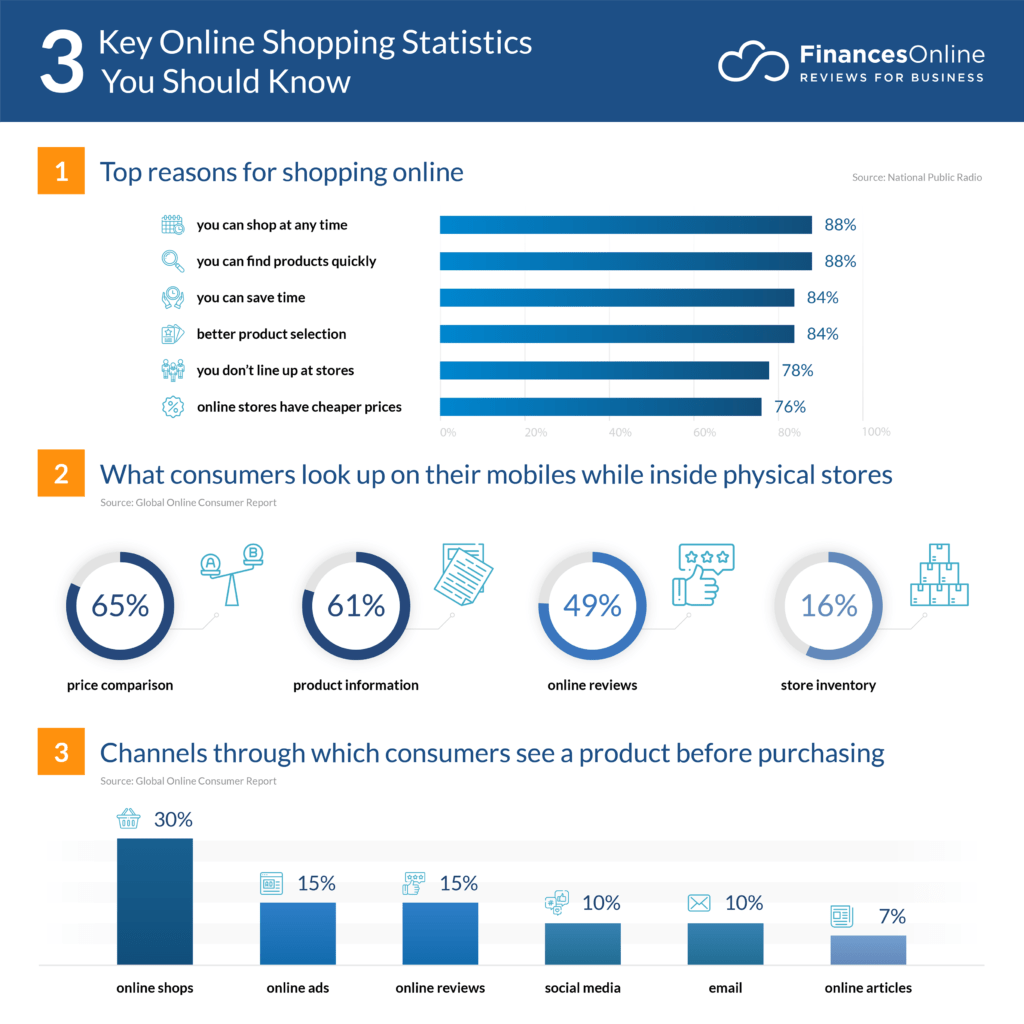
But before we get into the details, take a quick look at this chart to learn about customers’ online shopping preferences.

How customers are using the Flits customer account page on Shopify
1. To keep track of their orders
Believe it or not, post-purchase anxiety is one of the most common occurrences. Even when customers order from their regular eCommerce stores, they feel some amount of tension once the order is placed.
Did the payment go through? Has my order been received? What is the estimated delivery date? They may have many questions.
One way that brands keep them updated is via order status notifications sent by email, SMS, etc. But they might miss the notifications or get lost in the sea of messages they receive.
That’s when they go to the platform—Shopify customer account portal—that can give them all the information about their orders—the customer account page.
Customers use the account page to track their orders.
- Which products they have ordered—order history
- Order status – received, confirmed, processed, packed, dispatched, etc.
- Shipping status – order shipped, order in transit, order at shipping facility, etc.
- Delivery status – expected delivery, delayed delivery information, delivery partner details, etc.
Apart from this, customers also use this page for order live tracking (if the Shopify store includes the feature).
If the customers have queries about their order status, they use the Shopify customer account page to reach out to the brands—most eCommerce stores include a ‘contact us’ tab in the ‘orders’ section.
2. To save items in wishlists
The eCommerce space is full of options. Customers can choose from hundreds of websites and thousands of products.
Customers may like many things, but they can’t buy all of them at once. However, they could purchase the products in the near future.
This is when they look for the ‘add to wishlist’ button on the product page.
Wishlist is a feature that enables customers to add items they haven’t bought but desire or wish to buy in the future.
How customers use the wishlist feature:
- Wishlists make it easy for them to plan and organize their shopping
- Instead of browsing the store again to look for the specific items, customers easily head to their wishlists for quick checkout
- Customers wait for sales and discounts on those products and buy them at lesser prices
- They compare many products by adding to the wishlist as they can find their selection in one place
- They enjoy the shopping experience with the wishlist feature
And one place where customers can find their wishlists is the customer account page.
Most eCommerce stores include the wishlist feature on the account page. This makes it easy for customers to find and access their wishlists.
3. To easily place reorders
There are many products that customers need to order repeatedly. For example, groceries, medicines, health and wellness supplements, beauty, etc. These are items customers order on a monthly basis.
The process of placing new orders for the same items every time can seem tedious. Customers have to browse through the site for the same products, select them, add them to the cart, and go through the entire checkout process again.
Instead, the reorder button makes this process quick, fast, and hassle-free. Here’s how it helps customers:
- Customers go to the customer account page to their order history
- They go to the products that they want to order again
- Click on the reorder button
- They are led to the payment page
- Customers can complete their orders in just a couple of clicks
Moreover, most customers now use their mobile devices to shop online. The reorder button makes it easy for them to shop while they’re on the go. They simply have to click on the ‘reorder’ button.
Clicking on many buttons on a small screen is not the most comfortable shopping experience. Hence, this is one more advantage of the reorder button for customers who use their mobile devices for shopping.
4. When they need help
Gone are the days when customers simply made purchases, and that’s it. Instead, today’s customers have become comfortable with asking brands for help.
For example, customers want more information about products before buying them. They may want to know the exact delivery date before they place an order. They might want to place bulk orders and talk about discounted rates, etc.
Some customers might want to know if the eCommerce brand has a physical store. Or maybe, at times, customers’ accounts get locked, or there’s a glitch in the payment, etc.
At such times, customers look for help from eCommerce stores. And the first place they go to is the customer account page.
- Most Shopify customer account pages include the ‘contact us’ tab
- Customers can easily log into their account page and find ways to contact the brand
- They can choose from many options, such as email, phone, SMS, WhatsApp, etc.
- They can get their queries addressed faster
- Moreover, they have proof or can refer to their past conversations if they need to
The convenience of contacting online stores easily makes customers’ experience more satisfying because no one likes it when they can’t find the contact details of brands. Or when reaching brands starts seeming like an impossible task.
5. For easy shopping
Customers want easy shopping experiences. From the navigation to the signup process to finding products to placing orders—there are many factors that can make or break customers’ experience.
The customer account page ensures that for customers to a large extent. Let’s look at some features customers use to ease their shopping:
- Customers can save their personal details on the customer account page, such as name, delivery address, payment methods, card details, etc.
- They do not have to share these details in forms every time they shop
- Features such as the ‘reorder’ button allow them to place quick orders for recurring purchases
- They can add items they might want to purchase in the future in the ‘wishlist’ section
- The ‘recently viewed products’ section helps them identify products they browsed and liked, making it easy to make purchase decisions and resume shopping
Studies show that customer experience takes over factors such as price and product as the key brand differentiators—and ease of shopping is a critical factor that can make or break customer experience.
6. To track their loyalty points
Customers love receiving more in return when they shop from online stores. One such thing is loyalty points.
Customers shop, and brands give them loyalty points for spending on their sites. The more customers shop, the more points they earn.
At some point, customers can make more purchases using those loyalty points. It’s almost like a fun game for customers, where they have to accumulate more points.
And this is another reason why customers frequent the customer account page—to track their loyalty points.
Here’s how customers use the Shopify customer account page to track their points:
- The customer account page gives an overview of their loyalty points
- They can see the points earned, points used
- They can learn how they can earn more points
- Customers can learn how they can use the points they’ve accumulated
- When they want to buy items using the points, they can have a quick look at the amount of points they have and the amount of cash they’d need to shell out
- They can engage better with brands through their loyalty program/points section
7. To store details for quicker purchases
Another way customers use the customer account page is to store their details for shopping.
Instead of entering the same details every time they want to make a purchase, customers can save them on the customer account page.
Here’s how:
- Customers can save their personal details such as name, age, birth date, etc.
- They can save multiple delivery addresses, so the next time they want to get items delivered to different addresses, they simply have to select the preferred address
- Customers can save their preferred payment method.
- They can save their card details for quick payment and checkout
- Customers can use their social login details to sign in. This way, they don’t have to remember new login credentials and passwords
Does your online store need Shopify customer account pages?
Definitely! Your Shopify website needs a customer account page. If you haven’t set it up yet, not only are your customers missing out on its advantages, but even your business is missing out on helpful data—data that can help you understand your customers better.
To set up your customer account, you need the Flits Shopify customer account page app. It provides all the necessary features that can enhance your customers’ shopping experience on your site.
Explore Flits Customer Account Page App for your Shopify store.