


Learn How To Use The Social Login Feature On Your Shopify Store To Maximize Results
Here’s a simple question for you: lengthy forms or social login?
If you’re thinking like a customer, your answer is probably the latter.
86% of people prefer social login and avoid filling long forms to register on eCommerce sites. That’s because it’s convenient.
No matter how beautiful your eCommerce website, and how good your products are, if your website is not designed for customers’ convenience, your business could be on the way downward.
In this blog, we discuss eCommerce social login strategies you’ve probably never tried before for your Shopify eCommerce store.
What is Shopify social login?
The social login feature allows customers to sign up and login into eCommerce sites by using their existing social media account login ids and passwords. Users can use login credentials of Facebook login, Twitter, Pinterest, Instagram, LinkedIn, etc.
For customers, social login provides a fast and easy way to sign up and login. They do not need to remember a new login id and password. It also makes it easy for them to share content from the eCommerce site to their social accounts.
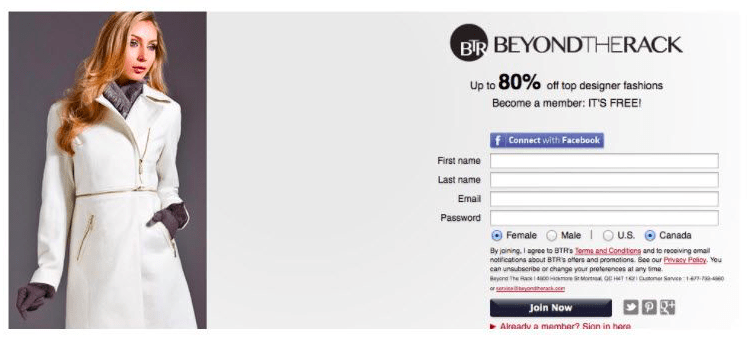

For Shopify businesses, the social login feature helps authenticate customers and reduce fake and redundant details. For example, people often use old and redundant email addresses to sign up to eCommerce sites. But with eCommerce social login, people mostly use real, authenticated, and in-use social accounts only.
Apart from these, there are many more benefits of eCommerce social login.
The benefits of social login for your Shopify store
Quick registration
The social login feature makes customer account page registration fast. As customers have to use their social media account details to log in, they don’t require too much time to come up with a valid login id and password. The registration form is short and requires just two to three details.
Increased sign ups
As the registration process is quick, easy, and simple, it drives more sign ups. 86% of people avoid filling lengthy sign up forms, and prefer to leave sites without registering. Motivate social login sign ups through different ways.
Convenience
One third of users say they leave websites because they don’t remember their passwords. With social login, customers don’t need to worry—they can use their social media login IDs and passwords. They don’t need to remember a new login id and password. Besides, many eCommerce sites provide options to log in via the social channel of their choice—Facebook social login, Instagram, Twitter, Pinterest, etc., giving customers options to choose from.
Authentication
When customers login via their social media account credentials, you automatically get a double authentication. Unlike email, people most likely use only one social media account. Hence, when signing up, they’d use an authentic social media account that’s in use. This assures authenticated customer sign up.
Easy social sharing
Ecommerce social login makes it easy for customers to share pages, products, etc., on their social media accounts. Moreover, it also provides you with more customer data as you have social account details of customers. In addition, another benefit is that you can always have updated information about users as people usually tend to keep their social media profile information updated.
Improves mobile conversions
The number of smartphone users has increased and so has the number of people who shop on their mobile devices. To make it easier for your mobile customers to transact on your mobile optimized site, you can use social login. Customers can easily sign up via their smartphones, and shop on the go, boosting your conversions.
Reduces cart abandonment
One of the top reasons customers abandon carts is a lengthy registration process on a site they’re shopping for the first time. Instead of filling long forms, customers tend to drop their shopping idea. But social login is a quick and easy method to sign up that requires just a few seconds, encouraging customers to complete their purchase and transaction.
If you’re still not convinced your Shopify store needs a social login strategy in sync with your marketing plan, let’s look at some facts and figures.
Why eCommerce social login is a necessity: facts and numbers
- 92% of users leave a site if they forget their login details
- More than 70% of customers are open to sharing posts about products they like on their social media accounts
- 77% of people like social login as a sign up option
- 4 out of 5 customers give false details when signing up on eCommerce websites
- Fewer fields in sign up and contact forms increases conversions
Strategies to use social login on your Shopify store to reach your goals faster
#1 Combine social media with your Shopify marketing campaigns
To target your customers, you’d be running marketing campaigns for your Shopify store. Alongside, you’d also be running social media marketing campaigns. You can leverage both by combining them.
For example, if you have a refer-a-friend program, enable customers to share referrals via social media accounts or by tagging friends on social media.
Here are some ways to combine campaigns across channels:
- Run referral programs via social media
- Combine social media and rewards programs
- Launch new collections exclusively on social media
- Make social login mandatory for contest participation
#2 Encourage social logins via social exclusive contests
Another social login strategy is to run contests exclusively on social media channels. Customers love contests—on average, 34% of new customers are acquired through contests.
Here are some ideas on how to run contests involving social media:
- Run contests when launching a new product/service exclusively on social media
- Make social media a part of campaigns you run on other channels, such as email, SMS, etc.
- Allow contest participation only via social login
- Ideas for social contests: like, share, and comment to win
- Run user-generated content contests (photo, video, etc.)
- Tag-a-friend contest
- Lucky draw contests
- Follow to win contests
And here are the steps to follow for running social media contests:
Step 1: Set your contest goals and choose a platform
Step 2: Determine the prize
Step 3: Promote contest in advance to create hype
Step 4: Follow best practices by following the platform guidelines
Step 5: Track and optimize contest performance
Step 6: Pick winners and announce on social platforms, motivate winners to share
#3 Use social media channels to communicate with customers
Ecommerce businesses have a lot of messages and notifications to send to customers. In recent years, customers have gotten used to receiving these alerts on social media messengers, such as Facebook messenger, Instagram DMs, etc.
Let’s look at how you can use social media channels to communicate with customers:
- Send order status updates on social messenger
- Share new product information and announcements
- Send exclusive deals and discounts
- Take customer support queries via social media messenger
#4 Choose an efficient Shopify social login app
One of the most important aspects of your Shopify store is having an efficient social login app. As your business scales, you’ll have many customers signing up on your customer account page. Managing so many sign ups manually is practically impossible. That’s why you need to automate the social login process. Consider these factors when choosing a social login app for your Shopify store:
- Ensure the app supports sign up via all social sites such as Facebook, Twitter, Instagram, LinkedIn, Google+, etc.
- Choose a social login app that automates welcome and thank you messages to engage customers
- The app should provide easy navigation and user experience features for customers as well as your in-house teams that have to access the backend or dashboard
- The app should help set up retargeting ads, email marketing campaigns, etc.
Install Flits social login app add-on on your Shopify store.
#5 Personalize customers’ onboarding experience based on social sign-up
All your customers won’t have the same preferences. Your customer base could be broad. They’ll fall into different segments, and hence, giving everyone the same generic onboarding experience won’t help. The key is personalization.
Personalization of customers’ onboarding journey can help improve your activation rate and sales. 59% of customers find personalization of content and product recommendations by brands useful.
Here’s what you can do:
- First, encourage them to sign up via social login
- Use the information from customers social media accounts to personalize their onboarding experience
- Example: cull data about customers age, gender, location, etc. and offer discounts on their first order on products relevant to their personal information
- Distill information that’s helpful for segmentation based on your products/services so that you can create a highly personalized onboarding experience
#6 Utilize data from social sites to understand customer preference
Having a social login feature has an advantage—when users login using their social media credentials, you can analyze data from their accounts to gain information about their preferences, likes, demographics, etc. You can then use this information to create personalized content and campaigns to target them in the future.
#7 Target millennials and Gen Z via social login strategies
Among the largest social media user groups are millennials and Gen Z. These generations and those to follow are comfortable with social media, whether it’s for personal or professional use. And hence, if you don’t leverage the customers that fall into these generation brackets, you’d miss out on many engagement opportunities.
- The new generations prefer to communicate with brands via social media messengers
- Using Shopify social login to target the new generations helps reach your business and campaign goals faster
- Millennials and Gen Z believe that brands offering social login are more savvy, up-to-date and leave a positive impression on them
- The new generations tend to spread word of mouth about brands they find tech savvy and innovative and provide a good experience
Wrap up: should you install a Shopify social login app?
To answer the question, here’s a recap of the key takeaways from the strategies we discussed above:
- Customers expect a relevant, fast, and good experience and social login is a factor that can ensure it
- Traditional sign up forms are outdated, time consuming, and don’t appeal new generations
- More and more consumers prefer social login
So, the definite answer is yes, you must install a comprehensive social login app on your Shopify store.
Explore Flits customer account app and social login add-on app on your Shopify store.