
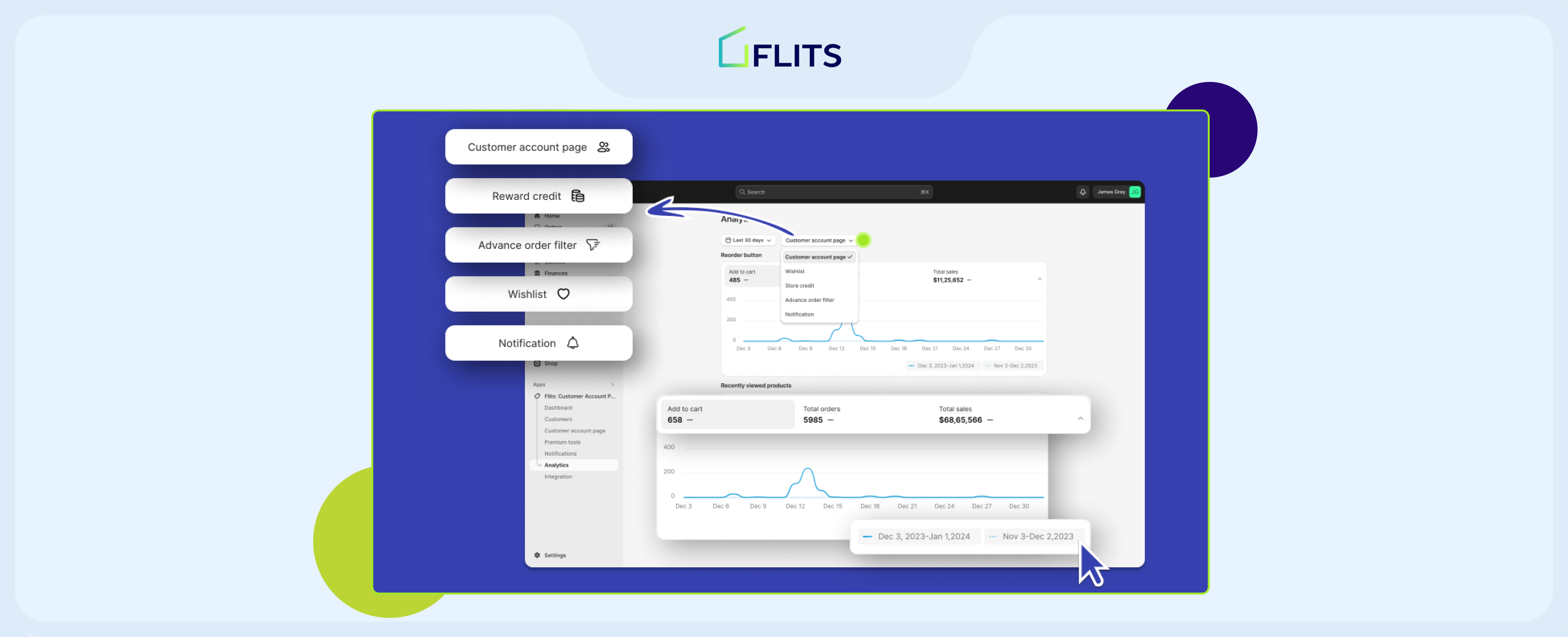
Analytics is the backbone of all business decisions and strategies, enabling businesses to understand their customers better, optimize operations, and drive growth.. Which is why Flits is finally launching Analytics feature to track the performance of all of our features.
Analytics empowers eCommerce businesses with invaluable insights derived from data, facilitating strategic planning and resource allocation.
Why are we launching analytics feature?
Flits is primarily a customer account page app that provides additional features for customer engagement and retention. It is important to note that all of our features are for the end user i.e. customer. Hence the interactions they have with our features are trackable and can be turned into insights.
But before diving into a detailed view of the analytics feature. It is important to understand the reason behind launching this feature.
Following are the benefits of data and reason for launching the feature-
Understanding Customer Behavior
- Analytics provides deep insights into customer behavior, purchase history, and preferences.
- By analyzing this data, businesses can tailor their marketing strategies, product offerings, and user experience to meet the specific needs and preferences of their target audience.
Improving Operational Efficiency
- Analytics helps eCommerce businesses identify inefficiencies in their operations and processes.
- By analyzing metrics such as inventory turnover, order fulfillment times, and customer service response rates, businesses can streamline their operations and improve overall efficiency.
Enhancing Marketing Effectiveness
- Analytics enables businesses to measure the effectiveness of their marketing campaigns and channels.
- By tracking metrics such as conversion rates, customer acquisition costs, and return on investment, businesses can optimize their marketing spend and allocate resources to the most profitable channels.
Predicting Trends and Opportunities
- Analytics allows eCommerce businesses to identify trends and opportunities in the market.
- By analyzing sales data, customer interests, and market trends, businesses can anticipate demand, identify emerging opportunities, and stay ahead of the competition.
Introducing the new analytics feature for Shopify stores
The following paras will give you a detailed view of the feature & features you can track with this feature.
Overview of analytics feature
Analytics will allow you to keep track of our the following features-
- Customer account page
- Reward credit (Loyalty & rewards)
- Advanced order filter
- Wishlist
- Notifications (reward & store credit) – yet to be launched
The Analytics feature also has filters for durations. The filters are as follows-
- last 7 days
- last 30 days
- last 60 days
- last 90 days
- last 6 months
- last 365 days

Exploring Key Features
Following are the metrics within each feature
- Customer Account Page
Customer account lets you track two metrics – a) Reorder button and b) Recently viewed items
a. Reorder button
In reorder graph merchants can view three graphs- number of clicks on add to cart under reorder option, number of orders placed via reorder and total sales made through reorders.
b. Recently viewed items
In recently viewed items graph merchants can view three graphs- number of clicks on add to cart under reorder option, number of orders placed via reorder and total sales made through reorders. - Wishlist
Under wishlist analytics you can view data of total clicks on ‘add to cart’ via wishlist button, total number of orders and total sales. - Reward Credits
There are three metrics under Reward credit- a) Earned credits b) Spent credits c) Order count
a. Earned credits
Earned credits has three graphs- total earned credits, credits earned on orders and credits earned via product tag credits
b. Spent credits
Spent credits has three graphs- total spent credits, spent on orders, expired credits
c. Order count
Order count has two graphs- Total number of orders on which customers earned credits, Total number of orders on which customers spent money. - Advanced order history
Advanced order history has three graphs- number of clicks on add to cart via advanced order button, total number of sales via add to cart & total sales via add to cart. - Notifications (Yet to be launched)
Notification analytics has two metrics- a) Welcome notifications b) Campaign notifications
a. Welcome notification has two graphs- total impressions and total clicks
b. Campaign notifications has four graphs- Total impressions, total clicks, total orders & total order amount
Real-World Use Cases for Our Analytics Feature
Any data type is valuable only if can be used for marketing campaigns, forecasting, improving sales, retention, etc. Hence, looking at all the ways you can use data from Flits analytics is essential.
Following are some use cases of each analytics data metric-
- Customer Account Page Metrics
With the help of Reorder data, merchants can improve forecasting; if reorder data is high, merchants can look at popular products, find out what they need to create/order more of and get a good idea of buying trends.
Identify Popular Products by analyzing the “Recently Viewed Items” metric to identify products with the highest engagement.
Shopify merchants can tailor marketing campaigns or product promotions based on the most popular items viewed by customers.
- Wishlist Metrics
Create targeted promotions by utilizing data on total clicks on “Add to Cart” via the wishlist button to identify products with high customer interest.
Create targeted promotions or rewards for items frequently added to wishlists to incentivize conversions.
- Reward Credits Metrics
Optimize loyalty program: Monitor metrics related to earned and spent credits to assess the effectiveness of the loyalty program.
Adjust credit earning and redemption rates based on customer behavior to optimize program engagement and retention.
- Advanced Order History Metrics
Cart Abandonment Reduction: Merchants can track the number of clicks on “Add to Cart” via the advanced order button to identify potential cart abandonment issues.
- Notifications Metrics
Campaign Performance Evaluation: Evaluate metrics related to welcome and campaign notifications to assess the effectiveness of communication strategies.
Merchants can refine messaging or timing based on notification engagement metrics to improve overall campaign performance.
These use cases demonstrate how Shopify merchants can leverage Flits’ analytics feature to gain actionable insights and optimize various aspects of an eCommerce store’s operations, from product offerings to customer engagement strategies. By analyzing these metrics and implementing data-driven decisions, Shopify store owners can enhance performance, drive growth, and improve overall customer satisfaction.
In conclusion, the introduction of Flits’ analytics feature marks a significant milestone for Shopify store owners seeking to unlock the full potential of their businesses.
Flits’ analytics feature offers a comprehensive suite of tools tailored to meet the evolving needs of Shopify merchants, enabling them to gain actionable insights and make informed decisions that propel their businesses forward.
Businesses must embrace innovation and leverage cutting-edge solutions like Flits’ analytics feature to stay competitive in today’s dynamic marketplace. With a commitment to continuous improvement and a customer-centric approach, Flits empowers Shopify store owners to thrive in the competitive environment, driving success and sustainable growth.
In essence, the launch of Flits’ analytics feature offers a transformative toolset to elevate their businesses to new heights. As we embrace the power of data-driven insights, let us embark on this journey together, seizing every opportunity to innovate, optimize, and achieve unparalleled success in eCommerce.


